Architecture
The system is divided into two parts—CARLA Module and FMOD Module. The CARLA part handles the setup of and communication with the CARLA simulator, while the FMOD part manages audio logic and playback.
1. CARLA
The CARLA part is responsible for connecting to the CARLA simulator and providing the simulation data that is later used by the FMOD subsystem for audio playback. Technically, it consists of a lightweight client that connects to the running CARLA server, locates/monitors the “hero” vehicle, reads relevant state information, and periodically sends it via UDP as JSON to a local receiver.
Folder Structure
cmain.py: Entry point for the CARLA client. Starts the data loop (polling simulation values) and sends data packets at a fixed interval. It also launches a small weather UI to adjust weather parameters during runtime.Classes/: Contains the core classes for connecting, sensing, data transport, and UI:__init__.py: Exposes the main classes as package imports.CarlaClient.py: Encapsulates the CARLA server connection, retrieves theworld, searches for a vehicle, and continuously reads vehicle and environment data. It also attaches a collision sensor and produces a compact data packet (relevant for the audio logic).CollisionSensor.py: Implements a CARLA collision sensor that counts collisions and measures their intensity, used to trigger crash events.Socket.py: Minimal UDP wrapper for sending JSON data (locally to 127.0.0.1 on a fixed port).Weather.py: Small Tkinter GUI used to set rain and wind intensity in the running simulation.
generate_traffic.py: Script to generate traffic in the simulator.requirements.txt: Python dependencies required for the CARLA client (to be installed into a venv).
Data Flow
cmain.pystarts the client and the sender loop.CarlaClientconnects to the simulator, finds the hero vehicle, and attaches aCollisionSensor.At short intervals, it reads relevant states (vehicle motion/control, speed/speed limit, weather, and events like collisions/honk).
Socketserializes the values as JSON and sends them via UDP to the local receiver (utils).
Goal of this module: Provide a robust and easily extensible interface between the CARLA simulation and the sound system, without embedding audio logic directly inside the CARLA side.
—
2. FMOD
The FMOD part handles the actual audio logic and audio playback. It receives data packets sent by the CARLA client (UDP/JSON), detects changes (diffing), and translates these changes into FMOD event triggers, parameter updates, or procedurally generated sounds. The structure is based on an MVC-style split: Model (data receiving/processing), Adapters (logic), and Banks/Sounds (audio resources and playback).
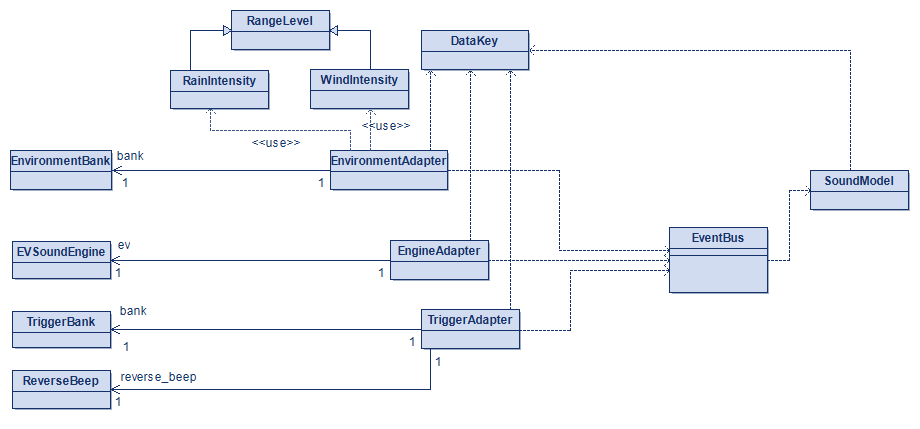
Figure 1: FMOD module class diagramm
Note
Adapter classes receive bank and sound class instances via their constructors.
Folder Structure
fmain.py: Entry point of the FMOD subsystem. Initializes:the central
EventBus(publisher-subscriber),FMOD
Banks(loading/initializing FMOD Studio events),Adapters(audio logic reacting to data changes),and the
SoundModel(UDP receive & diffing).
Then it runs a loop that regularly processes new data and ticks trigger/one-shot logic.
Model/SoundModel.py: Receives CARLA data via UDP, decodes the JSON, and computes the difference to the previous state. Only changed values are published via theEventBus. This reduces unnecessary sound updates and cleanly separates data handling from audio logic.
utils/EventBus.py: Lightweight event bus enabling loose coupling between publishers (model) and subscribers (adapters).DataKey.py: Central definition of all data keys (Enum). Ensures consistent keys, avoids typos, and supports easy extension.RangeLevel.py: Utility for mapping continuous values (e.g., intensities) to discrete levels.
Adapters/(Controller/Adapter layer): Components that subscribe to specificDataKeysand translate changes into audio actions.EnvironmentAdapter.py: Updates environment parameters (e.g., rain/wind) as FMOD parameters on continuously running events. Includes mapping from continuous intensities to levels (RainIntensity/WindIntensity).EngineAdapter.py: Handles engine/vehicle sounds. Instead of relying only on FMOD Studio events, it controls a procedural EV sound generator (parameters: speed/throttle → estimated “torque”).TriggerAdapter.py: Handles one-shot/trigger sounds such as crash, honk, handbrake, and reverse warning. Contains simple gating/state logic to prevent double-triggering in noisy input scenarios.RainIntensity.py/WindIntensity.py: Define intensity ranges as discrete levels (NONE, LOW, MEDIUM, HIGH) that are mapped to parameter values.
Banks/(FMOD Studio interface): Encapsulates loading FMOD bank files, creating event instances, and callingstudio_system.update():EnvironmentBank.py: Initializes FMOD Studio, loads the relevant bank, and provides instances for rain/wind (including parameter control).TriggerBank.py: Loads the trigger bank and exposes methods likeplay_*()for warning/crash/honk/handbrake.ExampleBank.py: Example class for Bank classes.
Sounds/(Procedural audio)EVSound.py: Generates EV/vehicle sounds procedurally using DSP oscillators, filters, and parameterized volume/frequency control based on speed and load.ReverseBeep.py: Procedurally generated reverse beep (short tone/pattern) as an alternative or supplement to FMOD Studio events.
requirements.txt: Python dependencies required for the FMOD subsystem (to be installed into a venv).
Data Flow
``fmain.py`` boots the FMOD subsystem: It creates the central
EventBus, initializes the required FMOD components (Banksand proceduralSounds), instantiates theAdaptersthat subscribe to data changes, and finally starts theSoundModel(UDP receiver).``SoundModel`` receives CARLA data via UDP: The model listens on a local UDP socket, decodes incoming JSON packets, and keeps the previous packet as a reference state.
Diffing: only changes are published: For each new packet, the model computes a diff against the last state. Only changed values are converted to
DataKeysand published on theEventBus.Adapters react to published updates:
Continuous values (e.g., speed, throttle, rain/wind intensity) are translated into parameter updates (FMOD parameters or DSP/procedural sound parameters).
Trigger-like values (e.g., collision, honk, reverse gear, handbrake) are handled with gating/state logic to avoid duplicate triggers and then played as one-shot sounds.
FMOD engine is kept alive via regular updates: Within the main loop in
fmain.py, the system processes model updates (publishing changes) and ticks adapter/bank update functions so FMOD event playback and procedural audio remain responsive and in sync.